fen2board for chess players
2026-01-26 07:40
A Python script to convert chess positions (FEN notation) and games (PGN format) into beautiful chessboard diagrams.
Available on codeberg
Supports multiple output formats:
- Terminal display with Unicode chess pieces and ANSI colors
- ASCII text with monochrome or color modes
- RTF documents with Chess Cases font or ASCII characters
Perfect for creating printable chess study materials, generating game annotations, or displaying positions in the terminal.
Features
- FEN to diagram: Convert any chess position to a visual board
- PGN to diagrams: Generate diagrams for every move in a game
- Multiple display modes:
- Unicode with ANSI colors (default terminal display)
- ASCII monochrome (
-am/--ascii-monochrome) - ASCII with colors (
-ac/--ascii-color) - Chess Cases font for professional RTF output
- RTF export: Generate professional documents with the Chess Cases font or ASCII art
- Board orientation: View from White's or Black's perspective (
--black) - Move filtering: Display specific move ranges (
--start,--end) - Multi-game support: Process PGN files with multiple games (hide variants)
Requirements
- Python 3.10 or higher
- For RTF output with Chess Cases: Chess Cases font installed
- For ASCII RTF output: Microsoft Consolas font (optional)
Installation
# Clone or download the script
git clone https://codeberg.org/adele/fen2board.git
cd fen2board

# Make it executable (optional)
chmod +x fen2board.py
Usage
Display a position in the terminal
Unicode display (default)
python fen2board.py "rnbqkbnr/pppppppp/8/8/8/8/PPPPPPPP/RNBQKBNR w KQkq - 0 1"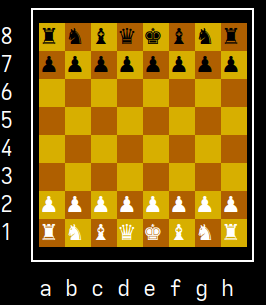
ASCII monochrome
python fen2board.py "rnbqkbnr/pppppppp/8/8/8/8/PPPPPPPP/RNBQKBNR w KQkq - 0 1" -am
  +----------------+
8 |r n b q k b n r |
7 |p p p p p p p p |
6 |  =   =   =   = |
5 |=   =   =   =   |
4 |  =   =   =   = |
3 |=   =   =   =   |
2 |P P P P P P P P |
1 |R N B Q K B N R |
  +----------------+
   a b c d e f g h
ASCII with colors
python fen2board.py "rnbqkbnr/pppppppp/8/8/8/8/PPPPPPPP/RNBQKBNR w KQkq - 0 1" -ac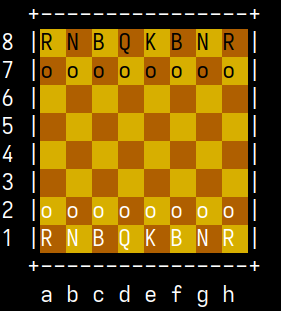
View from Black's perspective
python fen2board.py "rnbqkbnr/pppppppp/8/8/8/8/PPPPPPPP/RNBQKBNR w KQkq - 0 1" --blackProcess a PGN game
# Display all moves in terminal
python fen2board.py --pgn "1. e4 e5 2. Nf3 Nc6 3. Bb5 a6"

# Display moves 5-10 only
python fen2board.py --pgn "..." --start 5 --end 10

# Read PGN from stdin
cat mygame.pgn | python fen2board.py --pgn
Generate RTF documents
Chess Cases font font (default)
python fen2board.py "rnbqkbnr/pppppppp/8/8/8/8/PPPPPPPP/RNBQKBNR w KQkq - 0 1" -r output.rtf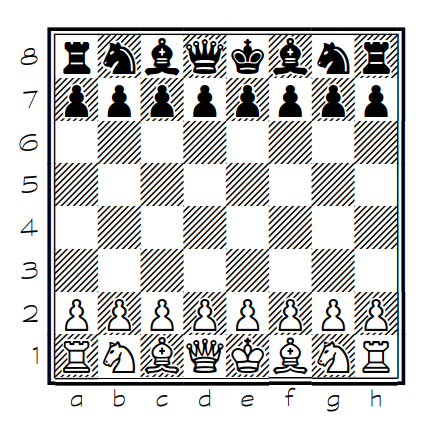
ASCII monochrome RTF
python fen2board.py "rnbqkbnr/pppppppp/8/8/8/8/PPPPPPPP/RNBQKBNR w KQkq - 0 1" -am -r output.rtf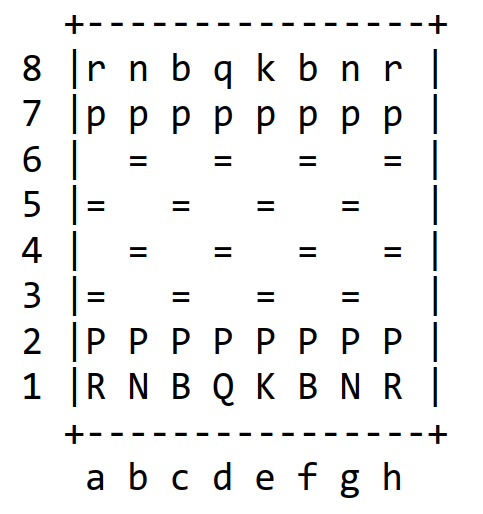
ASCII color RTF
python fen2board.py "rnbqkbnr/pppppppp/8/8/8/8/PPPPPPPP/RNBQKBNR w KQkq - 0 1" -ac -r output.rtf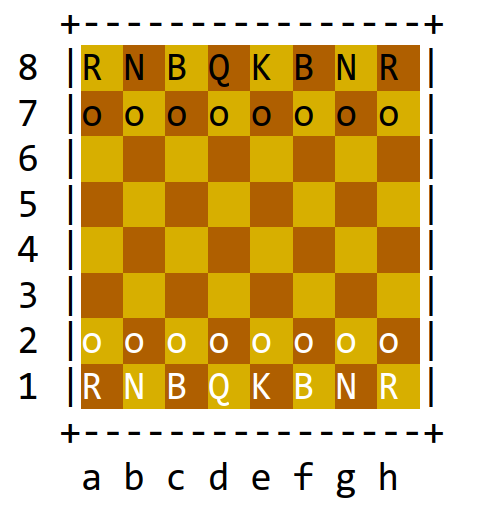
PGN game to RTF with Chess Cases font
python fen2board.py --pgn mygame.pgn -r analysis.rtfPGN game to ASCII color RTF
cat mygame.pgn | python fen2board.py --pgn -ac -r analysis.rtfCommand-line Options
| Option | Short | Description |
|---|---|---|
--black |
-b |
Display board from Black's perspective |
--pgn [FILE] |
-p [FILE] |
Process PGN game (use - or omit for stdin) |
--start N |
-s N |
Starting move number (PGN only) |
--end N |
-e N |
Ending move number (PGN only) |
--format-rtf FILE |
-r FILE |
Generate RTF file |
--ascii-monochrome |
-am |
Use ASCII characters (monochrome) |
--ascii-color |
-ac |
Use ASCII characters with ANSI colors |
Display Modes
Unicode Mode (Default)
Uses Unicode chess pieces (♔♕♖♗♘♙) with ANSI colors for terminal display. Best for modern terminals with Unicode support.
ASCII Monochrome (-am)
Uses standard ASCII characters:
- Pieces:
K Q R B N P(uppercase) andk q r b n p(lowercase) - Empty squares: space (light) and
=(dark) - Portable, works in any terminal or text editor
ASCII Color (-ac)
Uses ASCII characters with ANSI color codes:
- Pieces:
K Q R B N(uppercase),o(pawns) - Color distinguishes White (white text) from Black (black text)
- Background colors: gold (light squares), brown (dark squares)
- Same colors in console and RTF output
Chess Cases Font (RTF)
Optimal output using the Chess Cases font. Requires the font to be installed. Generates publication-quality diagrams.
RTF Output Details
- Font sizes: 14pt titles, 11pt text, 11pt Chess Cases boards, 10pt ASCII boards
- Pagination: PGN meta data and starting position on page 1, then 2 complete moves (4 boards) per page
- Headers: Game information (Event, Players, Date, etc.) on first page
- Move labels: Include move numbers and piece icons (Chess Cases mode)
- Comments: PGN comments are included in italic
Examples
Tactic puzzle in terminal
python fen2board.py "r3r1k1/ppp2ppp/2n5/3p2N1/N2P2n1/2P4P/PP1Bb1Pq/R3Q1K1 w - - 1 22"Game analysis to RTF
# Create a professional game booklet
python fen2board.py --pgn mygame.pgn -r analysis.rtf
Study material in ASCII
# Generate printable ASCII diagrams (compact, good for emails)
python fen2board.py --pgn study.pgn -am -r study.rtf
Color diagrams for presentation
# Beautiful colored ASCII diagrams
python fen2board.py --pgn game.pgn -ac -r presentation.rtf
License
This project is licensed under the GNU General Public License v3.0 - see the LICENSE file for details.
By Adële - adele.pages.casa
Credits
- Chess Cases font by Matthieu Leschemelle - https://www.dafont.com/chess-cases.font
- ANSI 256-color palette for terminal display
- Consolas font by Microsoft (used as fallback for ASCII RTF output)
Acknowledgments
Special thanks to the chess community for the PGN and FEN standards that make chess software interoperable.